PPC Agency, Freelancer or In-House? A UK Cost Guide
PPC company, freelance PPC consultant or an in-house hire? Compare true UK costs, cover and skills, with a decision tree and an ownership checklist.
SaaS landing page CRO for paid traffic: message match, trial sign-up friction, demo forms and scheduling, honest proof, and testing on low traffic.
This post covers the two pages where paid SaaS traffic turns into pipeline: the trial sign-up page and the demo request page. For a general page audit, use our landing page teardown framework.
Unbounce’s Conversion Benchmark Report puts the median SaaS landing page at 3.8%, against 6.6% across all industries. SaaS pages fed by paid search had a median of 4.1%, paid social 2.9% (Unbounce).
Use those as a sanity check, not a target. A demo page that converts at 2% on high-intent category keywords has room to grow. A trial page at 12% that fills up with students and competitors has a different problem.
The visitor typed something before they saw your ad. The page headline should answer that query in the same words. Someone who searched “CRM for real estate agents” and lands on “The all-in-one platform for growing teams” has to work out whether they’re in the right place. Many won’t bother.
Build pages by intent group:
Google lets you bid on competitor trademarks as keywords, but it can restrict a trademark in your ad text after a complaint (Google Ads policy). The landing page then carries the comparison the ad can’t.
Google rates landing page experience on how relevant and useful the page is to people who click your ad, and it feeds Quality Score (Google Ads Help). Message match helps both the visitor and your ad rank.
A trial page has one job: get a qualified person into the product.
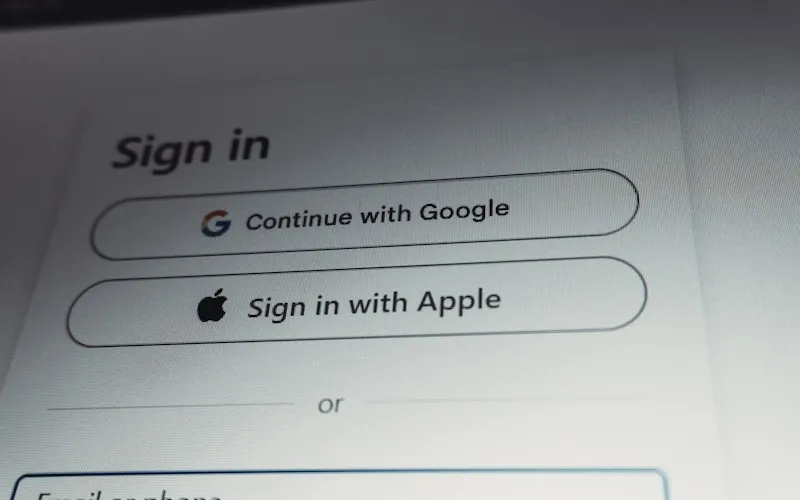
Offer single sign-on first. Sign in with Google lets users create an account without typing a password, and it can pre-fill the new account with profile data the user agrees to share (Google for Developers). For B2B products sold into Microsoft shops, add Microsoft sign-in next to it. Keep email sign-up below as the fallback.
Ask only for what the first session needs. Work email and password, or SSO, is enough to start. Company size, role and phone number can wait for onboarding, where you can ask once the user has seen value. Each field you add before the product loads is a reason to leave.
Say what happens after the click. “14-day trial, full features, no sales call” removes three objections in one line. Under the button, state whether you’ll ask for a card, when the trial ends and what happens then.
Decide on the credit card on purpose. Asking for a card up front cuts sign-ups and filters out people who never meant to buy. Leaving it off fills the trial with more people, and more of them never come back. Neither is right for every product. Pick based on what your sales and onboarding can handle, then measure trial-to-paid, not sign-ups, before and after any change.
Demo pages run the opposite trade-off. You want fewer, better requests, because each one costs a salesperson’s hour.
Ask the fields sales needs to route and qualify. Name, work email, company, company size and one question about the use case or current tool cover most sales teams. If a field doesn’t change who takes the call or whether the call happens, drop it.
Use dropdowns for qualifying fields. Company size as a dropdown (“1–10”, “11–50”, “51–200”, “200+”) gives you clean data to route on. Free-text answers don’t.
Book the meeting on the page. “We’ll be in touch within 24 hours” leaves a gap where the prospect cools off and books with a competitor who answered faster. Show a calendar right after the form submits. Scheduling tools handle the routing: Calendly, for example, can read a HubSpot form on submit and send the lead to the right booking page based on dropdown answers or email domain (Calendly Help Center). Route small accounts to a self-serve trial or a group demo and large ones to an account executive.
Say what the call is. “30 minutes with a product specialist. We look at your current workflow and show the parts that apply. No slide deck.” A prospect who knows the format of the call is more likely to book it.
Show proof you can back up:
In the US, the FTC’s rule on consumer reviews and testimonials has been in force since October 21, 2024. It bans fake reviews and testimonials, including ones attributed to people who don’t exist or never used the product, and lets the FTC seek civil penalties (Federal Register, FTC).
Put proof next to the claim it supports. A quote about fast setup belongs beside the “live in a day” line, not in a carousel at the bottom.
If you sell self-serve, yes. Link to the pricing page from the trial page, or show the plan the trial converts into. A visitor who doesn’t know whether the product costs $20 or $2,000 a month either leaves to find out or books a demo to ask, and that demo wastes a sales slot.
If you sell on custom quotes, say what drives the price (seats, usage, modules) and give a starting point if you have one. A line such as “Plans from $49 a month for 10 seats” (an example, use your own) qualifies visitors better than any form field.
SaaS marketing pages pile up scripts: chat widgets, analytics, heatmaps, A/B testing tools, scheduling embeds. Google’s Core Web Vitals call a page good at 2.5 seconds or less for Largest Contentful Paint, 200 milliseconds or less for Interaction to Next Paint and 0.1 or less for Cumulative Layout Shift, measured at the 75th percentile of real visits (web.dev).
Load the calendar embed after the form submits, and defer or drop the chat widget on paid landing pages.
Only large changes, in most accounts. Run the numbers first with Evan Miller’s sample size calculator. At a 4% baseline (close to Unbounce’s paid search median for SaaS), 95% significance and 80% power:
Say your demo page gets 2,000 paid visitors a month. A 50/50 test for a 20% lift runs close to ten months. A test for a 50% lift takes under two months.
So at SaaS volumes:
A page that doubles sign-ups can still cut revenue, if the extra sign-ups never activate. Track at least three numbers per landing page:
That means passing the landing page and click ID into your product database or CRM with each sign-up, then sending activation and qualification back to Google Ads and Meta. Our guide to which SaaS conversion event to bid on covers how to choose and send those events, and our conversion tracking service sets up the plumbing.
We build and test these pages as part of our landing page and CRO work, alongside the campaigns we run for SaaS companies. To see where your own trial or demo funnel leaks, start with our free Profit Growth Plan.
Unbounce’s benchmark data puts the median SaaS landing page at 3.8%, and 4.1% for paid search traffic (Unbounce). Judge your page on cost per activated trial or qualified demo, not on the raw rate.
It depends on your sales motion. Requiring a card lowers sign-ups and raises the share who intend to pay. Test it on trial-to-paid revenue per visitor, not on sign-up count.
As many as sales needs to route and qualify the request, and no more. For most teams that’s name, work email, company, company size and one use-case question.
At a 4% conversion rate, detecting a 20% relative lift takes about 9,700 visitors per variant (Evan Miller). Below that, test only large changes.
Related articles
PPC company, freelance PPC consultant or an in-house hire? Compare true UK costs, cover and skills, with a decision tree and an ownership checklist.
What GDPR and the ePrivacy rules mean for Google Ads and Meta tracking in the EU and UK: what needs consent, what Google requires, and server-side limits.
How to set up Google Ads conversion tracking: the Google tag, which actions to make primary, counting, windows, transaction IDs and how to check it works.
We use cookies for analytics and advertising. You can opt out of the sale or sharing of your data at any time.Cookie Policy
Your browser's Global Privacy Control signal is on, so we don't share your data for advertising.